
PX VPN Pro Residential & Anti-Detect
Enterprise Anti-Detect & Residential Proxy Client for Windows
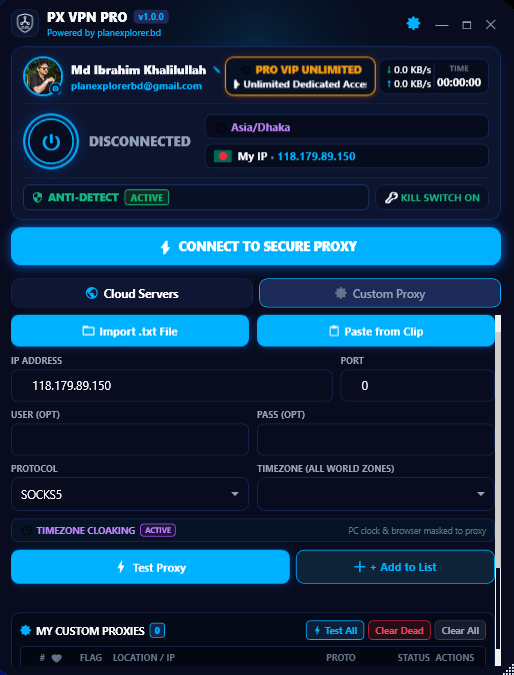
Product Overview & Architecture
Enterprise Anti-DetectPX VPN Pro is a high-performance Windows proxy and VPN software tailored for professionals. It features automatic Windows TimeZone synchronization, STUN WebRTC leak protection, DNS leak prevention, an integrated Anti-Detect browser launcher (Auto, Chrome, Edge, Brave), and a kernel-grade firewall kill switch.
Modern global freelancing platforms (Upwork, Fiverr), e-commerce marketplaces (Amazon, eBay, PayPal, Stripe), and ad networks utilize sophisticated multi-vector fingerprinting to identify proxy and VPN users. Conventional VPNs leak your computer's real operating system timezone through JavaScript (Intl.DateTimeFormat().resolvedOptions().timeZone) and expose your true local ISP broadband IP via WebRTC STUN candidate queries outside standard tunnels.
tzutil.exe to precisely mirror the connected residential node, establishes isolated sandboxed browser sessions (Chrome, Brave, Edge), and eliminates WebRTC STUN discovery without requiring permanent or unsafe kernel driver modifications.
Core Engineering Capabilities
Automated Windows Clock Synchronization (tzutil)
When you connect to a proxy server in London, Frankfurt, or New York, the client automatically executes native Windows tzutil.exe /s to change the operating system timezone. Websites checking your system clock find 100% coherence between your IP location and local time.
Zero STUN WebRTC & DNS Isolation
WebRTC STUN protocol communicates outside standard HTTP proxy tunnels, frequently exposing home broadband IPs. PX VPN Pro integrates automated anti-detect shield policies ensuring browser STUN leaks are completely neutralized.
Anti-Detect Multi-Browser Launcher Hub
Launch Google Chrome, Microsoft Edge, or Brave Browser directly from PX VPN Pro with completely separated user profiles, unique canvas fingerprints, and pre-configured proxy routing.
Real-Time Node Latency & Automatic Fail-Safe Cleanup
Each proxy node is actively pinged for live millisecond latency. Upon disconnect or app termination, Windows system proxy and original timezone settings are unconditionally restored to ensure zero disruption.
4-Step Installation & Setup Guide
Fast ~30s SetupDownload & Quick Setup
Download the Windows (.EXE) setup package (858 KB). Run the clean installer wizard in seconds.
Choose Residential Node
Launch PX VPN Pro, browse global residential locations (US, UK, DE, CA, SG) with live ping metrics, and click Connect.
Auto-Sync Windows Timezone
Windows system clock and registry match your proxy country in ms via native tzutil.exe.
Launch Anti-Detect Browser
Launch isolated Chrome, Edge, or Brave profiles with zero WebRTC STUN leaks and 100% verified anonymity.
Frequently Asked Questions
Click any question to view answertzutil.exe for operating system timezone synchronization and to configure network adapter proxy settings without installing untrusted third-party kernel drivers. PX VPN Pro operates cleanly with zero background bloatware.
Intl.DateTimeFormat().resolvedOptions().timeZone against your public IP's geolocation. Standard VPNs cannot alter your Windows OS clock, creating an instant mismatch flag. PX VPN Pro automatically matches your PC's registry timezone to the connected proxy node in milliseconds, eliminating the #1 red flag detected by fraud scoring engines.
Technical Specs
Verified package details
Ibrahim Khalilullah
Founder & Principal Software ArchitectEngineered by Plan Explorer for professionals needing bulletproof residential routing and timezone spoofing protection on Windows.